Wed 8 Feb 2006
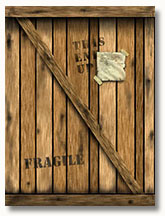 Ron Dunlap shows in this detailed tutorial how to create a wooden crate. This old tutorial was originally written for Photoshop 3 and 4 but should still be easy to follow for intermediate users of later Photoshop versions.
Wed 8 Feb 2006
Ron Dunlap shows in this detailed tutorial how to create a wooden crate. This old tutorial was originally written for Photoshop 3 and 4 but should still be easy to follow for intermediate users of later Photoshop versions.
Tue 7 Feb 2006
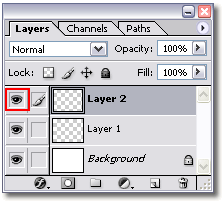 You can hide all layers in your layers palette, except for the active layer, by holding down the Alt key (option key on the Mac) and clicking on the eye icon in front of the active layer.
Mon 6 Feb 2006
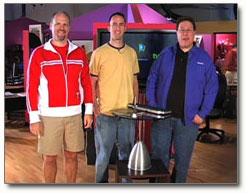 The ‘Photoshop Guys’ at PhotoshopTV, Dave Cross, Matt Kloskowski and Scott Kelby have released the 16th episode of PhotoshopTV. In this episode they will again share some tips, news, tutorials and answer some questions.
Some things that are getting attention is a tutorial for handwriting effects, Adobe bridge and how to use it for the most common tasks and a tutorial on how to create photo collages.
Mon 6 Feb 2006
 The NAPP (National Association of Photoshop Professionals) offers a quiz in which you can test your Photoshop knowledge by answering 20 Photoshop related questions.
Sat 4 Feb 2006
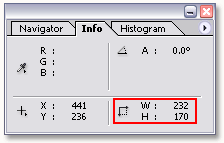 If you want to crop an image using a specific size then you might think about editing the values for width and height in the option bar when the crop tool is active. The downside of this method is that it will resize your crop selection to meet the width and height that were entered.
Instead don’t enter any values in the option bar, but use the information of the Info Palette instead.
Fri 3 Feb 2006
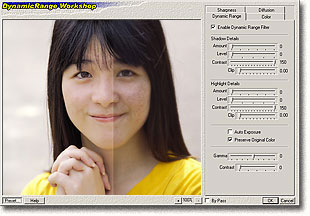 DynamicRange Workshop Plug-in for Photoshop is software that enhances details, enhances contrast, recovers highlight/shadow, improves sharpness, increases dynamic range of images.
Features
- Increase dynamic range of images
- Enhance color saturation and contrast
- Smart sharpen filter
- Smart blur filter
- Auto Exposure
- Grain effect
- Preview with Real-time high quality
- Support automate batch and actions for image processing
- Support presets saving and loading
- Support RGB 48 bits and RGB 24, 32 bits
- Works with Adobe Photoshop 5 and later versions, Adobe Photoshop CS
Thu 2 Feb 2006
 Not everyone might know that Adobe’s Studio Exchange is a great place to download all kind of files for Photoshop. At the moment Adobe Studio Exchange offers thousands of files in 14 categories:
- Actions
- Brushes
- Custom Shapes
- Displacement Maps
- Filters
- Gradients
- ImageReady Actions
- ImageReady Droplets
- Patterns
- Plug-ins
- Scripts
- Styles
- Templates
- Tutorials
Wed 1 Feb 2006
There are 3 quick ways to copy a layer style:
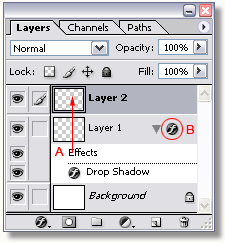
1. Click on the word Effects (A) in the layers palette and drag it to the target layer.
2. Right click on the icon marked with B and select Copy Layer Style. Right click on the target layer and select Paste Layer Style.
3. Only Photoshop CS2: Hold down the Alt key (option key on the Mac) and drag/drop the icon marked with B on the target layer.
Tue 31 Jan 2006
 When ever you edit an image, you run the risk of its histogram becoming chopped up in bands. This is called “posterization” and can happen when you use for example levels or curves.
The Histogram Repair plugin by Power Retouch tries to fix the empty gaps in the histogram.
Mon 30 Jan 2006
 Photoshop guru Matt Klowkowski is your host in a new daily video podcast launched by The National Association of Photoshop Professionals (NAPP).
The 2 min podcast will contain tips & tricks, shortcuts and tutorials.
You can subscribe to this postcast at Photoshopkillertips.com
|
|
You are currently browsing the Lunacore Photoshop Blog weblog archives.


