Sun 25 Mar 2012

Improvements and new features of Photoshop CS6
* Redesigned interface
* Darker interface (optional)
* Improved performance in multiple areas
* New Crop tool
* New filter: Oil Paint
* More advanced video editing, all Photoshop effects can now be applied to video
* Improve Camera Raw, plus two new controls (highlight and shadows)
* New blur gallery: field blur, iris blur, tilt-shift blur
* Bridge rewritten for 64-bit
* Background Save and Auto-recovery
* Adaptive Wide Angle
* Improved Filter Gallery
* New Content Aware Move
* Improvements to paint engine
* Improvements to working with Shapes
* New Type menu
* Type Styles
* Vector strokes
* Dashed lines
* Skin Tone-Aware selections and masking
* 3D improvements (Photoshop Extended only)
* New Search Tool in Layers Palette
* Performance improvements for Liquify Filter
* Patch tool now has Content Aware (optional)
* New Properties panel
* Improved and expanded GPU acceleration
* Improved Lighting Effects filter

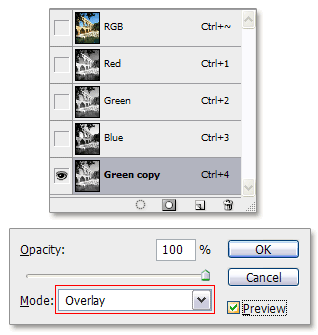 The are no blending options in the channels palette, but is it still possible to blend? Yes, you can use Image / Apply Image, but I would like to show a different way.
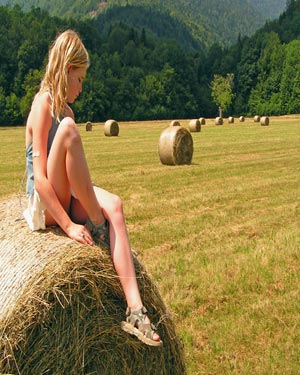 I resized the image in Photoshop with Image/Resize, deselected Constrain Proportions and lowered the width from 500 to 300 pixels.
 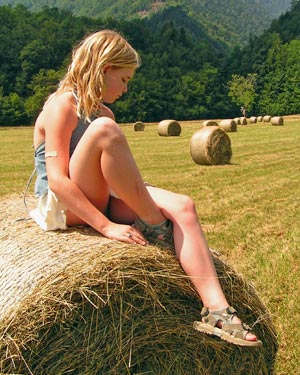 I used the same original, but this time I resized with Picutel Smart Resize after making a selection around the girl first.
 You can even take it a step further and make multiple selections. In this example I included the big roll of hay in the background in my selection:


