Mon 20 Feb 2006
PanosFX offers 31 free Photoshop actions, some of them that are pretty cool.
The action list includes:
Cracked Wall painting, Deck, 100, B&B Filmstrip 35mm, High Pass Sharpening, B & Big picture, Puzzle Quatro, 3D, Metallon, Metallic Grid Text, 25Matrix, Sprocket feed border, Weaved Border, Edge effects, Mosaic Effects, Meander frame, B&B Animated, Photris, Rodax frame, The big picture, Stamp, Scroll, Carved Marble Text, Big Blue, Photo Album, Video Wall, Snowed Text, Weave it, Puzzle Effects, B&B set of effects and B&B Filmstrip.
We have tried only B&B Filmpstrip 35mm; the results were very good and the action was also easy to use.
Tip: try to figure out how some of the actions work and learn from them.

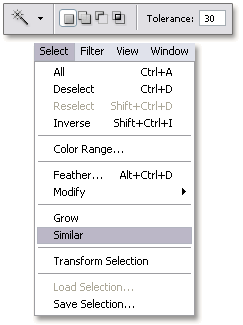 The Similar command works with selections and allows you to include pixels throughout the image, not just adjacent ones, falling within the tolerance range.
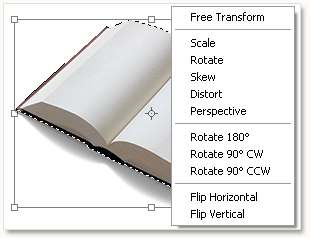 If you want to free transform an image or part of it, use the shortcut Ctrl + T ( Command + T on the Mac) and right click inside the bounding box ( Control + click on the Mac) to bring up a window in wich you can select your prefered transformation.

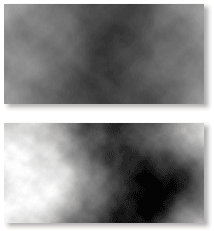 If you prefer more contrast with Photoshop’s clouds filter, then try this; hold down the Alt key (options key on the Mac) and select Filter / Render /Clouds. This also work with Difference Clouds.